

Overwatch 2 themed team battle artwork introducing Killer Vibe automatic reactions for combat, recovery, rounds, and results.

Overwatch 2 Event Audio

Overwatch 2 Automatic Soundboard

Killer Vibe automatically plays the clips you assign when supported Overwatch 2 events report an elimination, assist, death, respawn, revive, round transition, or match result. Separate combat and recovery cues can add personality without requiring manual soundboard presses during a team fight.

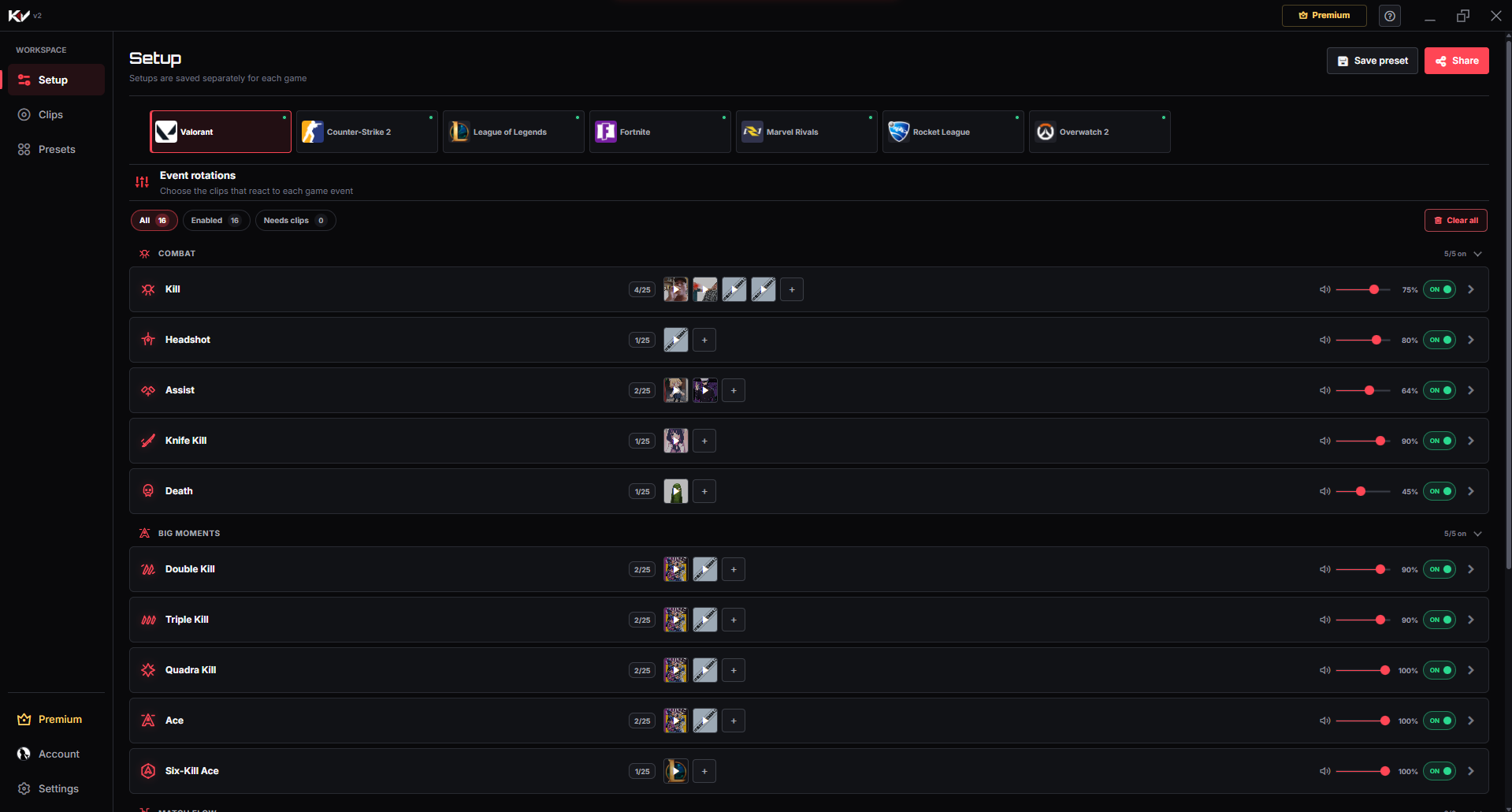
Killer Vibe Setup screen showing supported Valorant events with assigned sound clips and per-event playback controls.
This real screenshot shows the Killer Vibe Valorant Setup screen. In the shared interface, users select a game, assign clips to supported events, enable or disable each event, and choose playback settings and an output device; event cards vary by game, and this Overwatch 2 page lists its exact supported labels below.

Product proof

From match moment to sound reaction

Give eliminations, recovery moments, round changes, and final results their own sound identity while keeping important team audio easy to hear.

  1. 01Game event

    A supported moment happens while you play.

  2. 02Killer Vibe

    The assigned reaction is selected automatically.

  3. 03Selected output

    Your clip plays through the output device you chose.

Event catalog

Supported Overwatch 2 event labels

These are the event labels currently used by Killer Vibe for Overwatch 2. Assign sounds only to the moments you want, and leave the rest disabled or unassigned.

Combat & Recovery

Elimination

When a supported Elimination event is received for you.

Assist

When a supported Assist event is received.

Death

When your player receives a Death event.

Respawn

When your player returns through a Respawn event.

Revive

When a supported Revive event is received.

Round Flow

Round Start

When a supported Overwatch 2 round begins.

Round End

When a supported Overwatch 2 round reaches its end.

Match Flow

Match Start

When a supported Overwatch 2 match begins.

Match End

When a supported Overwatch 2 match reaches its end.

Victory

When the supported match result is Victory.

Defeat

When the supported match result is Defeat.

Make each moment recognizable

Overwatch 2 reaction ideas

Start with a few short reactions, test their volume against game audio, and expand only when every sound still has a clear purpose.

Elimination and assist cues

Use a stronger clip for Elimination and a lighter cue for Assist so personal finishes remain distinct from team contributions.

EliminationAssist

Respawn and revive responses

Give Respawn a reset cue and Revive a separate recovery response so returning to the fight feels different in each case.

RespawnRevive

Round and result stings

Use brief transition audio for Round End and contrasting final stings for Victory and Defeat without overwhelming post-match audio.

Round EndVictoryDefeat

Get started

Setup flow

The setup path is intentionally simple: install through Overwolf, pick the game, map clips, then let supported game events trigger playback.

DOWNLOAD ON OVERWOLF
  1. 1

    Install Killer Vibe through Overwolf and open its Setup screen.

  2. 2

    Choose Overwatch 2 and review the combat, recovery, round, and match events.

  3. 3

    Assign clips to the events you want and balance their volume against game and team audio.

  4. 4

    Launch Overwatch 2 with Killer Vibe running so supported events can trigger your selected clips.

Audio routing

Who hears the sound?

Killer Vibe plays Overwatch 2 clips through the output device you select. Teammates do not hear them automatically through voice chat, and streams hear them only when that output is included in the capture mix.

  • You hear the selected outputKiller Vibe plays each assigned clip through the output device selected in the app.
  • A stream needs to capture itOBS or other streaming software hears the clip only when it captures that same audio path.
  • Voice chat stays separateKiller Vibe does not automatically inject clips into Discord, party chat, or in-game team voice.

What to know before you install

  • Ultimate use, hero switching, objective events, and Play of the Game are not listed as supported Overwatch 2 triggers.
  • Round and match transitions depend on event data available through the Overwolf provider.
  • Sounds play through your selected output device rather than being injected into team voice.

FAQ

Overwatch 2 soundboard FAQ

Can Killer Vibe react to Overwatch 2 eliminations and assists separately?

Yes. Elimination and Assist are separate supported events, so each can use a different clip and volume.

Are Overwatch 2 ultimate or objective triggers available?

Ultimate, hero-switch, objective, and Play of the Game triggers are not listed. Killer Vibe uses the supported combat, recovery, round, and match labels shown here.

What is the difference between Respawn and Revive reactions?

They are separate supported event labels. You can give a normal Respawn one clip and a Revive a different recovery response.

Build your Overwatch 2 reactions.

Start with supported events, assign clips, and keep the timing out of your hands while you play.

DOWNLOAD ON OVERWOLF